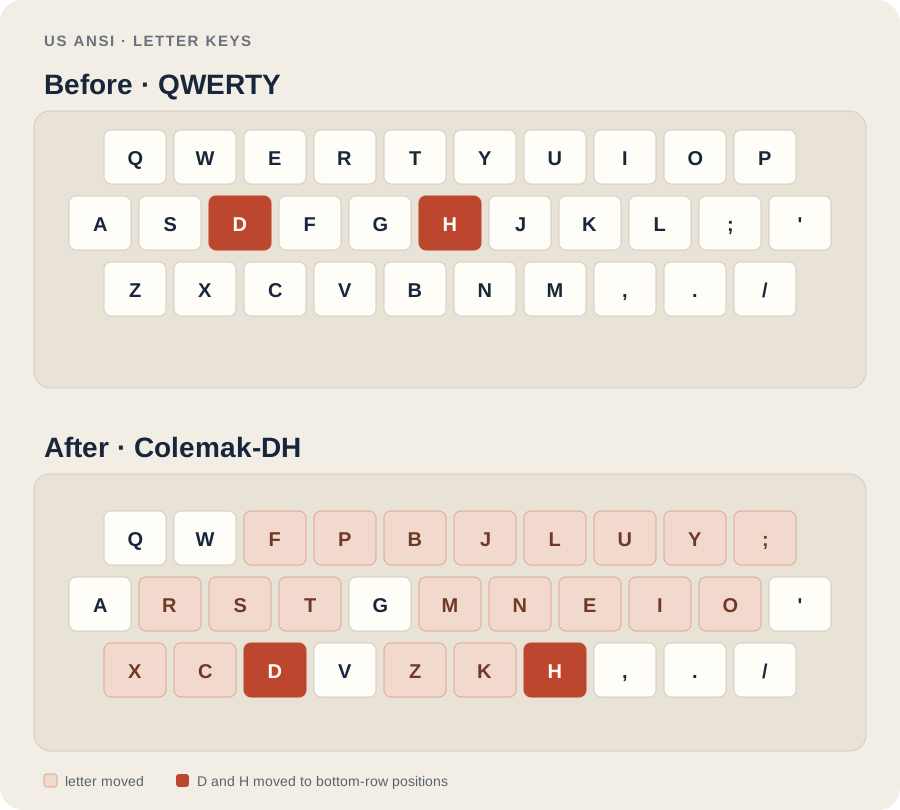
Same keyboard. Different letter positions. The graphic is drawn for this page and included locally, so it doesn’t rely on an image hosted elsewhere.
Highlighted keys move in the Colemak-DH mapping. D and H are shown in the stronger accent.
A modelled comparison
Estimated typing effort per key
In the ColemakMods scoring model, lower is better.
QWERTY · traditional
2.400
Colemak-DH · ergonomic
1.735
These are the upstream author’s estimates from a simulated English-text corpus, not a measured typing-speed result. The comparison uses each layout’s recommended finger technique, so it isn’t a clinical or universal ergonomics score. See the model and its assumptions.
Downloads
Pick your system.
These files are served directly from this portfolio. The Colemak-DH layout files are credited to their upstream project below.
setxkbmap -layout us -variant colemak_dh -option caps:backspace
The script and command are for X11. On Wayland, choose Colemak-DH in your desktop keyboard settings and set Caps Lock to Backspace in its keyboard options.
What changes?
Colemak-DH adjusts a few letter positions from Colemak, including D and H, to reduce reaching into the middle columns. The standard DH mapping works across staggered and matrix keyboards; the layout details vary by keyboard type.
Before you switch
Keep your current layout enabled while you learn. Your keyboard’s printed labels will still show QWERTY, and login or password screens can behave differently depending on how the layout was installed.
Layout mapping and comparison figures are credited to ColemakMods’ Colemak Mod-DH project. This page’s keyboard graphic is an original local SVG; no layout image or code is loaded from the upstream site at runtime. The layout implementations are public domain (CC0 1.0). Attribution and source revision.